Choose the agent and model for each task, and run several at once in isolated worktrees so their changes stay separate. Swap in something better whenever it ships. Kepler stays agnostic, so your stack stays yours.
2.
Choose an action. Skip the prompting.
Start from a built-in Action instead of a blank prompt. One click hands the agent the issue, the diff, and the repo state, already attached. Edit the prompt, model, and skills behind any Action, or save your own.
3.
From Idea to merged without losing the thread.
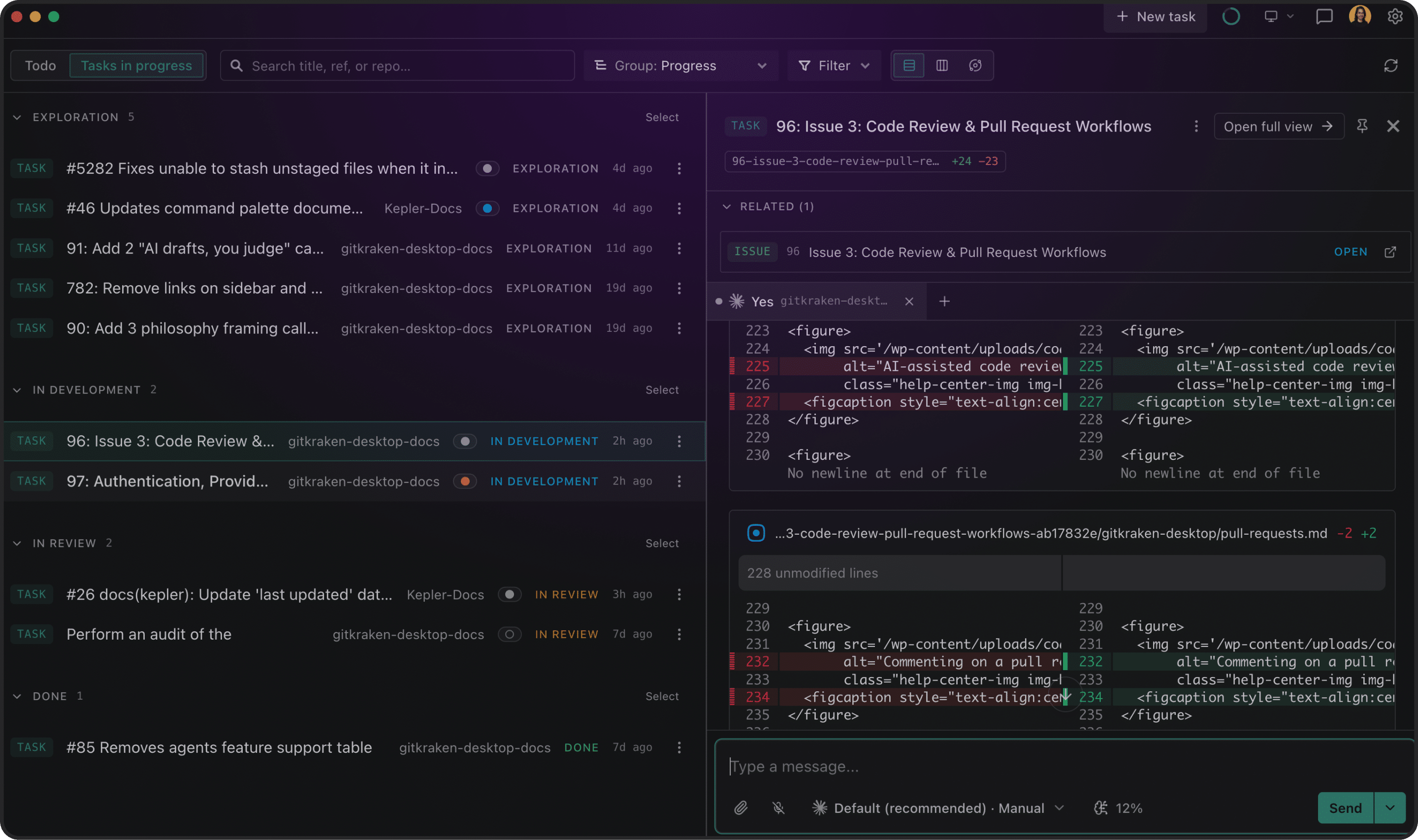
Start from an idea, an issue, or a PR. Explore a solution, turn it into tracked work, implement it, review it, address feedback, and then get it merged without rebuilding context across tools and agent sessions.
4.
Watch Every Agent Work.
Agent Graph draws your agent work as it happens. Every Task, every session, every turn, every tool call, and every subagent appears live as the work runs. Click any node for its status, its exact input, and what it did last. It’s a practical way to run agents in parallel while seeing what each one is doing.
5.
Turn repeatable work into reusable Actions.
Start with built-in Actions for implementing issues, reviewing PRs, and addressing feedback. Change the prompts, models, and skills behind them or build and save your own.
6.
Swap Agents, Not Workflows.
Any agent. Any tracker. Any host, self-hosted included. Kepler works with the tools you already run, and you can change the agent per Action whenever something better ships. What you’ve configured carries over. New agent, same setup.
5.
All The Way To Merged.
An agent finishing isn’t the same as work that’s ready to ship. Parallel worktrees put each agent’s changes on its own branch. Per-branch diffs beside the Task that created them. Stage, review, commit, open the pull request. A raw agent stops at ‘done.’ Kepler takes you the rest of the way to merged code.
Kepler fits your environment & Setup, Out of the box
Running parallel AI agents shouldn’t force you to rewrite your toolchain or compromise your local setup. Kepler seamlessly bridges your local machine, remote boxes, and existing issue trackers, giving you full control over agent workflows without changing how you code.
SSH • WSL
Remote environments
SSH into another box or drop into WSL and run Kepler’s agents there: worktrees, diffs, and Actions on the machine where the code actually builds
Mobile
Control it from your phone
Kepler stays on your machine. Kick off an Action, check what an agent is doing, and answer its questions from wherever you are.
Automation
Commands and worktree setup
Keep your repo’s commands one click away Run them automatically every time Kepler creates a worktree, so your setup script fires before the agent starts.
Views
See it how you think about it
An Agent View with live status of agent work, a kanban showing every agent’s state at a glance, or a dense list for easy scanning. Same work, arranged the way you want to look at it.
Tasks
Start from nothing
No repo, no worktree, or no issue? Chase an idea first, then turn it into a tracked issue once it’s worth tracking.
Search
Find Any Issue Or Pull Request
Search and filter across every tracker, repo, and host you’ve connected, down to the single issue or PR you’re thinking of.
integrate with your existing stack
Kepler works with the agents you are already running, your Git provider, and your issue tracker. Connect your existing setup and Kepler becomes the surface around it.
This product is just amazing! It is exactly what i need as lead AI engineer.
David Bonan, Lead AI Engineer
Kepler is an amazing AI orchestration tool because it works with the AI CLI workflows I already use rather than locking me into a single model or ecosystem. It gives me a consistent flow for managing agents across different eco systems, in a simple familiar way, allowing me to focus on what matters rather than wrangling different agent CLIs.
Kevin Bost, Senior Software Architect
Unification of approach is what I’ve been doing for the past 30 years. I have been moving through things just trying to make it more simpler, more easier, more work. You’ve just done another one for me with Kepler. Thank you so much.
Jon Humphrey , Senior Front-End Engineer
Built On Ten Years Under The Hood
GitKraken has spent a decade on the layer agentic tools treat as plumbing: branches, worktrees, diffs, commits, merges. That’s why Kepler can take an agent’s output and actually get it shipped, instead of handing you a pile of changes. And because Kepler knows what stage each piece of work was in, GitKraken Insights can answer the question every engineering org is now asking about agent spend: did any of it reach production?
GitKraken Plans & Pricing
Community
Basic GitKraken Desktop, CLI & GitLens for OSS development
Connect your existing agents, start a Task from your backlog or PR queue, and see what it looks like to run agents at scale without losing track of anything. Free to try.
Kepler is GitKraken’s agentic development environment (ADE), which means it helps you kickoff coding agent sessions across multiple repos.
It gives developers full clarity and control to scale their use of parallel agents, across planning work, writing code, and reviewing what ships. You start from your existing backlog or PR queue, run agents across multiple repos, and see every session from one surface.
An ADE (Agentic Development Environment) is the workspace built for a developer whose primary job is no longer writing code but directing AI agents that write it. Where an IDE was built for one developer typing code, an ADE is built for one developer running multiple agents in parallel. Kepler is GitKraken’s ADE.
GitKraken Desktop is built for one developer, one agent, one repo at a time. Kepler is built for developers scaling parallel agents across multiple repos simultaneously. If you are already using GitKraken Desktop and managing several agents, Kepler is the next step. GitKraken Desktop remains the right tool for focused, single-repo work.
Kepler is agent-agnostic, and it currently integrates with Claude Code, Codex, GitHub Copilot, Cursor, Open Code, and Auggie. Connect the agent you are already using and Kepler manages the sessions, visibility, and review around it. You can run different agents in different worktrees inside the same Task.
A Task is the container that holds your work across repos. You start one from an issue in your tracker (like Jira, Linear, Trello, GitHub Issues, or GitLab Issues) or a PR in your queue. Kepler creates the worktrees, launches your agents, and keeps everything connected through shared context. A Task can span any number of repos.
Yes. Kepler connects to your issue tracker so you can select issues and have agents start on them directly. Connect to Jira, Linear, Trello, GitHub Issues, or GitLab Issues. You can also pick a pull request and have an agent handle the follow-on work. The entry points are the same ones you already use.
Yes. Kepler works with GitHub Enterprise and GitLab Self-Managed. Connecting to a self-hosted service requires a Personal Access Token with the appropriate permissions. See the Integrations documentation for setup instructions.
Visual Studio Code is required to install GitLens.
Secure cloud-backed services that span across all products in the DevEx platform to keep your workflows connected across projects, repos, and team members
Launchpad – All your PRs, issues, & tasks in one spot to kick off a focused, unblocked day.Code Suggest – Real code suggestions anywhere in your project, as simple as in Google Docs.Cloud Patches – Speed up PR reviews by enabling early collaboration on work-in-progress.Workspaces – Group & sync repos to simplify multi-repo actions, & get new devs coding faster.DORA Insights – Data-driven code insights to track & improve development velocity.Security & Admin – Easily set up SSO, manage access, & streamline IdP integrations.


 GitKraken Desktop
 GitLens for IDEs
  Kepler
 GitKraken MCP
 GitKraken CLI
 GitKraken Insights
 Git Integration for Jira
 Dev Team Automations
 AI & Security Controls
 Supercharge Your Dev Team
  Secure Your Dev Team























 Add to Chrome
 Add to Firefox
 Add to Microsoft Edge