NEW COURSE • 100% FREE

Foundations Of AI For Software Development

Enroll To Get Started →
OFERTA DÍA DE MUERTOSAHORRA HASTA 70%Oferta Por Tiempo LimitadoComprar ahora

Git Blog

Releasing the Power of Git

Kep, the Kepler mascot, with three notice lines above it, glancing at the headline Your Parallel Agents, After Conductor, on a purple night sky.

Conductor is joining Meta. What that means if you run parallel agents

On November 4, Conductor announced it’s joining Meta. If you run your agents in Conductor, you probably saw the post that morning. I know I saw it when my coworkers started sharing the link in Slack.

If Conductor was your main tool, this kind of sucks. You didn’t plan to go shopping for a new one this month, and 2 weeks to get off Cloud is pretty tight, especially if you built scripts around it.

What changes, and when

Here’s the schedule from Conductor’s announcement:

Date What happens
Nov 4, 2026 No new sign-ups or downloads. Pro users keep Pro features for free.
Nov 13, 2026 Cloud workspaces go read-only. You can read old chats and export, but not send new messages. Active subscribers get a refund.
Nov 20, 2026 Conductor Cloud shuts down, and Cloud data deletion begins.
Early 2027 The local Mac app starts winding down. Until then, it gets new models and critical bug fixes.

If you use Cloud, export before November 20. Right-click a workspace and choose Transfer to local, or go to Settings → Account → Export data for everything.

Conductor says it’s building something new at Meta, and hopes to have it ready by early 2027. In the meantime, though, your backlog doesn’t pause while you wait to find out.

What you’d miss

A big reason Conductor caught on: it let you run several agents at once without them stepping on each other. Each agent got its own copy of the repo. You could watch them all, then review and merge from one place.

Once you work that way, going back to one agent in one terminal feels pretty slow. It’s like getting a dishwasher. You lived without one for years, and now washing every plate by hand feels like a chore you shouldn’t have to do. Most people are loath to go back to the sink.

Well, you don’t have to. Kepler, GitKraken’s agentic development environment (ADE), runs the agents you already use in parallel, each in its own worktree. And it takes the work past “the agent says it’s done,” all the way to a merged pull request.

How Kepler compares to Conductor

If you ran several agents side by side on your own machine, Kepler will feel pretty familiar, and you’ll have more agents to pick from. If Conductor Cloud’s sandboxes or shared workspaces were a big part of your day, the table shows where things stand.

  Conductor Kepler
Runs on macOS only macOS, Windows and Linux
Coding agents Claude Code, Codex, Cursor and OpenCode The same 4, plus GitHub Copilot, Auggie, Grok Build, Pi, Google Antigravity and any ACP agent
Parallel agents, each on its own worktree Yes Yes
Review the diff and open a pull request Yes Yes
Git hosts GitHub GitHub, GitLab, Bitbucket and Azure DevOps, including self-hosted
Where agents run Your Mac, or a Cloud sandbox that keeps going after you close the app (until Nov 20) Your machine, a box you SSH into, or WSL
Move a workspace between cloud and local Yes (until Nov 20) No
Several people prompting the same agents Yes, in shared Cloud workspaces (until Nov 20) Not yet
API and webhooks Yes, in beta Not yet

What you get in Kepler

The same agents, still in parallel

Kepler works with Claude Code, Codex, GitHub Copilot, Cursor, OpenCode, Auggie, Grok Build, Pi and Google Antigravity. You can also add any other agent that speaks the Agent Client Protocol (ACP). If you ran Claude Code or Codex in Conductor, connect that same agent with your own account.

Each agent runs in its own worktree, so its changes land on their own branch and stay out of your main checkout. You can even run different agents in different worktrees inside the same Task. When something better ships, swap the agent in. Your setup stays put.

See what every agent is doing

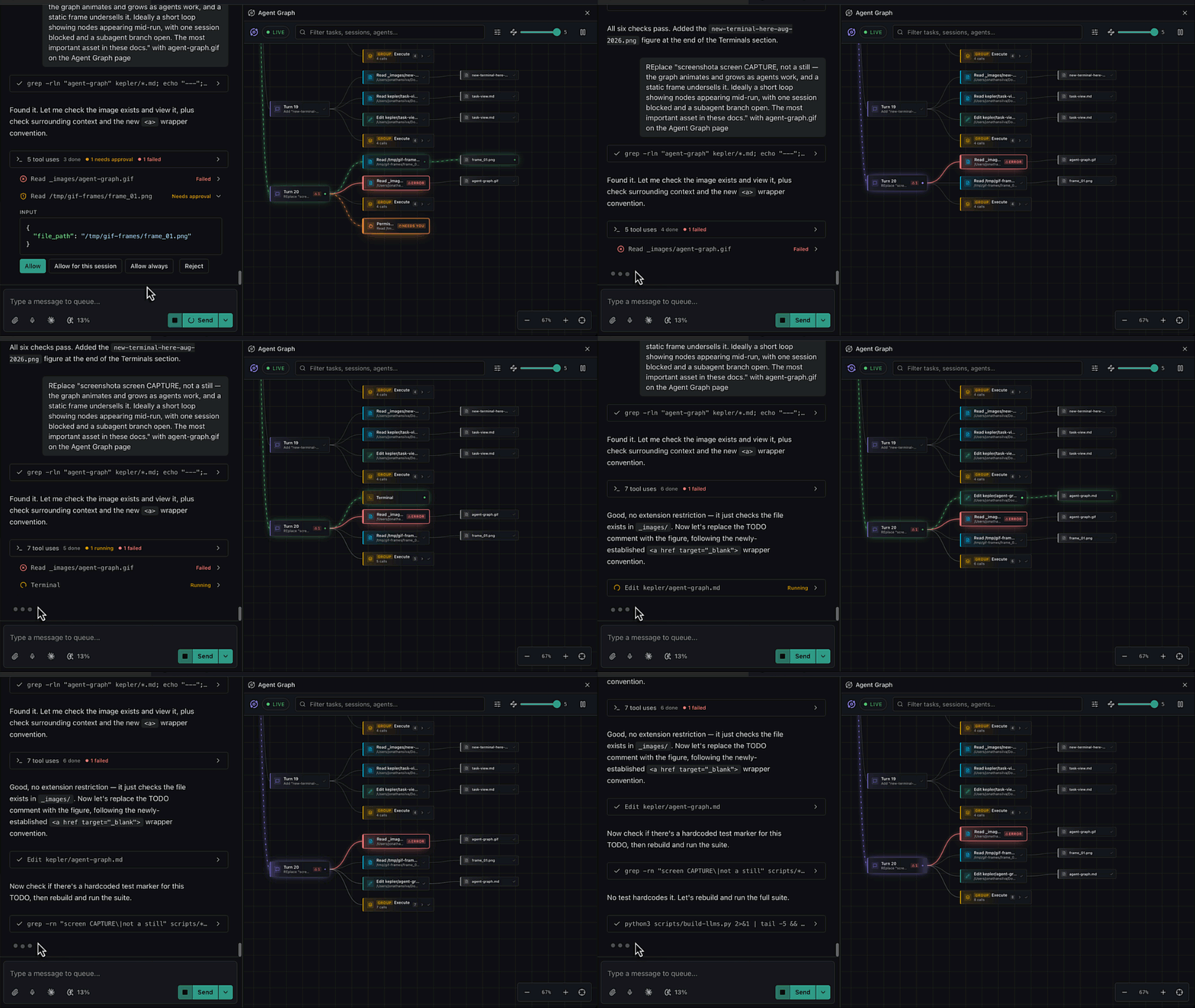
Agent Graph draws your agent work as it happens: every Task, session, turn, tool call and subagent. Click any node for its status, its exact input and what it did last.

If I’m running 4 agents at once, this is the screen I keep open. One is waiting on me. Another touched a file I didn’t expect. I can see both without clicking through 4 chats.
Done isn’t the same as ready to ship

An agent finishing isn’t the same as work that’s ready to ship. You still answer for the code, whoever wrote it. When a reviewer asks why a file changed, “the agent did it” doesn’t really cut it.

Kepler shows a per-branch diff beside the Task that made it. From there you stage, review, commit and open the pull request without leaving the app. If you want a say before any code changes, start with the Plan Action. The agent proposes an approach and waits. Comment on any step, send it back, or click Approve & implement.

It may seem silly to slow down right when the agent says it’s done. But that’s the moment you decide whether you can stand behind it.

Start from the issue, skip the prompt

Kepler’s Todo view lists the issues and pull requests that involve you, from GitHub, GitLab, Bitbucket, Azure DevOps, Jira, Linear and Trello. Each row has an Action button. Click it, and Kepler creates a Task, sets up a worktree and starts your agent with the issue, the diff and the repo state already attached.

The button picks the Action for you: Plan for an issue, Review for someone else’s PR and Address Feedback for one of yours. You can change the prompt, model and skills behind any Action, or save your own.

One Task, several repos

A lot of real changes touch more than one repo: the API and the client, or a library and the app that uses it. A Kepler Task can span any number of repos, with the worktrees and agents for each one kept together.

Run it where the code builds

Kepler can SSH into another box or drop into WSL and run agents there, with worktrees, diffs and Actions on the machine where your code builds. From your phone, you can start an Action or answer an agent that’s waiting on you.

Moving over in 5 steps

  1. Save your Conductor work. Commit or push anything in progress so it lives on a branch. If you used Cloud, export before November 20.
  2. Download Kepler and sign in with a GitKraken account. A new one or the one you use for GitKraken Desktop or GitLens both work.
  3. Connect your agent. Kepler looks for installed agents the way your shell does, including ones from nvm or Homebrew. Missing one? Open Settings → Agents to install it or point Kepler at it.
  4. Start a Task. Click New task (or press Cmd/Ctrl+N), describe the work, attach a repo and hit Start. Or pick an issue in Todo and click its Action button.
  5. Start a second one. Once 2 agents are running, open Agent Graph and watch them side by side.

Your repos and branches are plain Git, so they come with you. Your Conductor chat history doesn’t.

Try it this week

You don’t have to decide anything today. Your local Conductor app keeps working into early 2027. But if you’ve got 20 minutes, pick one real issue, give it to an agent in Kepler, and see if you’d ship what comes back.

Coming from Conductor? We’d love to hear what you’d miss. Click Feedback in Kepler’s top bar, or open an issue at github.com/gitkraken/gk-ade. What’s the one Conductor habit you’d want Kepler to keep?


Like this post? Share it!

Read More Articles

On November 4, Conductor announced it’s joining Meta. If you run your agents in Conductor, you probably saw the post that morning. I know I saw it when my coworkers started sharing the link in Slack.

If Conductor was your main tool, this kind of sucks. You didn’t plan to go shopping for a new one this month, and 2 weeks to get off Cloud is pretty tight, especially if you built scripts around it.

What changes, and when

Here’s the schedule from Conductor’s announcement:

Date What happens
Nov 4, 2026 No new sign-ups or downloads. Pro users keep Pro features for free.
Nov 13, 2026 Cloud workspaces go read-only. You can read old chats and export, but not send new messages. Active subscribers get a refund.
Nov 20, 2026 Conductor Cloud shuts down, and Cloud data deletion begins.
Early 2027 The local Mac app starts winding down. Until then, it gets new models and critical bug fixes.

If you use Cloud, export before November 20. Right-click a workspace and choose Transfer to local, or go to Settings → Account → Export data for everything.

Conductor says it’s building something new at Meta, and hopes to have it ready by early 2027. In the meantime, though, your backlog doesn’t pause while you wait to find out.

What you’d miss

A big reason Conductor caught on: it let you run several agents at once without them stepping on each other. Each agent got its own copy of the repo. You could watch them all, then review and merge from one place.

Once you work that way, going back to one agent in one terminal feels pretty slow. It’s like getting a dishwasher. You lived without one for years, and now washing every plate by hand feels like a chore you shouldn’t have to do. Most people are loath to go back to the sink.

Well, you don’t have to. Kepler, GitKraken’s agentic development environment (ADE), runs the agents you already use in parallel, each in its own worktree. And it takes the work past “the agent says it’s done,” all the way to a merged pull request.

How Kepler compares to Conductor

If you ran several agents side by side on your own machine, Kepler will feel pretty familiar, and you’ll have more agents to pick from. If Conductor Cloud’s sandboxes or shared workspaces were a big part of your day, the table shows where things stand.

  Conductor Kepler
Runs on macOS only macOS, Windows and Linux
Coding agents Claude Code, Codex, Cursor and OpenCode The same 4, plus GitHub Copilot, Auggie, Grok Build, Pi, Google Antigravity and any ACP agent
Parallel agents, each on its own worktree Yes Yes
Review the diff and open a pull request Yes Yes
Git hosts GitHub GitHub, GitLab, Bitbucket and Azure DevOps, including self-hosted
Where agents run Your Mac, or a Cloud sandbox that keeps going after you close the app (until Nov 20) Your machine, a box you SSH into, or WSL
Move a workspace between cloud and local Yes (until Nov 20) No
Several people prompting the same agents Yes, in shared Cloud workspaces (until Nov 20) Not yet
API and webhooks Yes, in beta Not yet

What you get in Kepler

The same agents, still in parallel

Kepler works with Claude Code, Codex, GitHub Copilot, Cursor, OpenCode, Auggie, Grok Build, Pi and Google Antigravity. You can also add any other agent that speaks the Agent Client Protocol (ACP). If you ran Claude Code or Codex in Conductor, connect that same agent with your own account.

Each agent runs in its own worktree, so its changes land on their own branch and stay out of your main checkout. You can even run different agents in different worktrees inside the same Task. When something better ships, swap the agent in. Your setup stays put.

See what every agent is doing

Agent Graph draws your agent work as it happens: every Task, session, turn, tool call and subagent. Click any node for its status, its exact input and what it did last.

If I’m running 4 agents at once, this is the screen I keep open. One is waiting on me. Another touched a file I didn’t expect. I can see both without clicking through 4 chats.

Done isn’t the same as ready to ship

An agent finishing isn’t the same as work that’s ready to ship. You still answer for the code, whoever wrote it. When a reviewer asks why a file changed, “the agent did it” doesn’t really cut it.

Kepler shows a per-branch diff beside the Task that made it. From there you stage, review, commit and open the pull request without leaving the app. If you want a say before any code changes, start with the Plan Action. The agent proposes an approach and waits. Comment on any step, send it back, or click Approve & implement.

It may seem silly to slow down right when the agent says it’s done. But that’s the moment you decide whether you can stand behind it.

Start from the issue, skip the prompt

Kepler’s Todo view lists the issues and pull requests that involve you, from GitHub, GitLab, Bitbucket, Azure DevOps, Jira, Linear and Trello. Each row has an Action button. Click it, and Kepler creates a Task, sets up a worktree and starts your agent with the issue, the diff and the repo state already attached.

The button picks the Action for you: Plan for an issue, Review for someone else’s PR and Address Feedback for one of yours. You can change the prompt, model and skills behind any Action, or save your own.

One Task, several repos

A lot of real changes touch more than one repo: the API and the client, or a library and the app that uses it. A Kepler Task can span any number of repos, with the worktrees and agents for each one kept together.

Run it where the code builds

Kepler can SSH into another box or drop into WSL and run agents there, with worktrees, diffs and Actions on the machine where your code builds. From your phone, you can start an Action or answer an agent that’s waiting on you.

Moving over in 5 steps

  1. Save your Conductor work. Commit or push anything in progress so it lives on a branch. If you used Cloud, export before November 20.
  2. Download Kepler and sign in with a GitKraken account. A new one or the one you use for GitKraken Desktop or GitLens both work.
  3. Connect your agent. Kepler looks for installed agents the way your shell does, including ones from nvm or Homebrew. Missing one? Open Settings → Agents to install it or point Kepler at it.
  4. Start a Task. Click New task (or press Cmd/Ctrl+N), describe the work, attach a repo and hit Start. Or pick an issue in Todo and click its Action button.
  5. Start a second one. Once 2 agents are running, open Agent Graph and watch them side by side.

Your repos and branches are plain Git, so they come with you. Your Conductor chat history doesn’t.

Try it this week

You don’t have to decide anything today. Your local Conductor app keeps working into early 2027. But if you’ve got 20 minutes, pick one real issue, give it to an agent in Kepler, and see if you’d ship what comes back.

Coming from Conductor? We’d love to hear what you’d miss. Click Feedback in Kepler’s top bar, or open an issue at github.com/gitkraken/gk-ade. What’s the one Conductor habit you’d want Kepler to keep?


On November 4, Conductor announced it’s joining Meta. If you run your agents in Conductor, you probably saw the post that morning. I know I saw it when my coworkers started sharing the link in Slack.

If Conductor was your main tool, this kind of sucks. You didn’t plan to go shopping for a new one this month, and 2 weeks to get off Cloud is pretty tight, especially if you built scripts around it.

What changes, and when

Here’s the schedule from Conductor’s announcement:

Date What happens
Nov 4, 2026 No new sign-ups or downloads. Pro users keep Pro features for free.
Nov 13, 2026 Cloud workspaces go read-only. You can read old chats and export, but not send new messages. Active subscribers get a refund.
Nov 20, 2026 Conductor Cloud shuts down, and Cloud data deletion begins.
Early 2027 The local Mac app starts winding down. Until then, it gets new models and critical bug fixes.

If you use Cloud, export before November 20. Right-click a workspace and choose Transfer to local, or go to Settings → Account → Export data for everything.

Conductor says it’s building something new at Meta, and hopes to have it ready by early 2027. In the meantime, though, your backlog doesn’t pause while you wait to find out.

What you’d miss

A big reason Conductor caught on: it let you run several agents at once without them stepping on each other. Each agent got its own copy of the repo. You could watch them all, then review and merge from one place.

Once you work that way, going back to one agent in one terminal feels pretty slow. It’s like getting a dishwasher. You lived without one for years, and now washing every plate by hand feels like a chore you shouldn’t have to do. Most people are loath to go back to the sink.

Well, you don’t have to. Kepler, GitKraken’s agentic development environment (ADE), runs the agents you already use in parallel, each in its own worktree. And it takes the work past “the agent says it’s done,” all the way to a merged pull request.

How Kepler compares to Conductor

If you ran several agents side by side on your own machine, Kepler will feel pretty familiar, and you’ll have more agents to pick from. If Conductor Cloud’s sandboxes or shared workspaces were a big part of your day, the table shows where things stand.

  Conductor Kepler
Runs on macOS only macOS, Windows and Linux
Coding agents Claude Code, Codex, Cursor and OpenCode The same 4, plus GitHub Copilot, Auggie, Grok Build, Pi, Google Antigravity and any ACP agent
Parallel agents, each on its own worktree Yes Yes
Review the diff and open a pull request Yes Yes
Git hosts GitHub GitHub, GitLab, Bitbucket and Azure DevOps, including self-hosted
Where agents run Your Mac, or a Cloud sandbox that keeps going after you close the app (until Nov 20) Your machine, a box you SSH into, or WSL
Move a workspace between cloud and local Yes (until Nov 20) No
Several people prompting the same agents Yes, in shared Cloud workspaces (until Nov 20) Not yet
API and webhooks Yes, in beta Not yet

What you get in Kepler

The same agents, still in parallel

Kepler works with Claude Code, Codex, GitHub Copilot, Cursor, OpenCode, Auggie, Grok Build, Pi and Google Antigravity. You can also add any other agent that speaks the Agent Client Protocol (ACP). If you ran Claude Code or Codex in Conductor, connect that same agent with your own account.

Each agent runs in its own worktree, so its changes land on their own branch and stay out of your main checkout. You can even run different agents in different worktrees inside the same Task. When something better ships, swap the agent in. Your setup stays put.

See what every agent is doing

Agent Graph draws your agent work as it happens: every Task, session, turn, tool call and subagent. Click any node for its status, its exact input and what it did last.

If I’m running 4 agents at once, this is the screen I keep open. One is waiting on me. Another touched a file I didn’t expect. I can see both without clicking through 4 chats.

Done isn’t the same as ready to ship

An agent finishing isn’t the same as work that’s ready to ship. You still answer for the code, whoever wrote it. When a reviewer asks why a file changed, “the agent did it” doesn’t really cut it.

Kepler shows a per-branch diff beside the Task that made it. From there you stage, review, commit and open the pull request without leaving the app. If you want a say before any code changes, start with the Plan Action. The agent proposes an approach and waits. Comment on any step, send it back, or click Approve & implement.

It may seem silly to slow down right when the agent says it’s done. But that’s the moment you decide whether you can stand behind it.

Start from the issue, skip the prompt

Kepler’s Todo view lists the issues and pull requests that involve you, from GitHub, GitLab, Bitbucket, Azure DevOps, Jira, Linear and Trello. Each row has an Action button. Click it, and Kepler creates a Task, sets up a worktree and starts your agent with the issue, the diff and the repo state already attached.

The button picks the Action for you: Plan for an issue, Review for someone else’s PR and Address Feedback for one of yours. You can change the prompt, model and skills behind any Action, or save your own.

One Task, several repos

A lot of real changes touch more than one repo: the API and the client, or a library and the app that uses it. A Kepler Task can span any number of repos, with the worktrees and agents for each one kept together.

Run it where the code builds

Kepler can SSH into another box or drop into WSL and run agents there, with worktrees, diffs and Actions on the machine where your code builds. From your phone, you can start an Action or answer an agent that’s waiting on you.

Moving over in 5 steps

  1. Save your Conductor work. Commit or push anything in progress so it lives on a branch. If you used Cloud, export before November 20.
  2. Download Kepler and sign in with a GitKraken account. A new one or the one you use for GitKraken Desktop or GitLens both work.
  3. Connect your agent. Kepler looks for installed agents the way your shell does, including ones from nvm or Homebrew. Missing one? Open Settings → Agents to install it or point Kepler at it.
  4. Start a Task. Click New task (or press Cmd/Ctrl+N), describe the work, attach a repo and hit Start. Or pick an issue in Todo and click its Action button.
  5. Start a second one. Once 2 agents are running, open Agent Graph and watch them side by side.

Your repos and branches are plain Git, so they come with you. Your Conductor chat history doesn’t.

Try it this week

You don’t have to decide anything today. Your local Conductor app keeps working into early 2027. But if you’ve got 20 minutes, pick one real issue, give it to an agent in Kepler, and see if you’d ship what comes back.

Coming from Conductor? We’d love to hear what you’d miss. Click Feedback in Kepler’s top bar, or open an issue at github.com/gitkraken/gk-ade. What’s the one Conductor habit you’d want Kepler to keep?


Visual Studio Code is required to install GitLens.

Don’t have Visual Studio Code? Get it now.

Team Collaboration Services

Secure cloud-backed services that span across all products in the DevEx platform to keep your workflows connected across projects, repos, and team members
Launchpad – All your PRs, issues, & tasks in one spot to kick off a focused, unblocked day. Code Suggest – Real code suggestions anywhere in your project, as simple as in Google Docs. Cloud Patches – Speed up PR reviews by enabling early collaboration on work-in-progress. Workspaces – Group & sync repos to simplify multi-repo actions, & get new devs coding faster. DORA Insights – Data-driven code insights to track & improve development velocity. Security & Admin – Easily set up SSO, manage access, & streamline IdP integrations.
winget install gitkraken.cli