Run coding agents in isolated worktrees and follow every change in GitKraken Desktop. Inspect the diffs, reshape raw output into logical commits, and decide what’s ready for your pull request. Includes a 14-day Pro trial.
See What Your Agents Changed. Know What to Do Next.
An agent finishes a task. You spot a missing check in the diff. Send it back for another pass, review the update, and decide when the branch is ready.
GitKraken Desktop brings that workflow into one app:
See the agent-to-review workflow in GitKraken Desktop.
An agent finishes a task. You spot a missing check in the diff. Send it back for another pass, review the update, and decide when the branch is ready.
GitKraken Desktop brings that workflow into one app:
Start agent tasks in separate worktrees. Track changes across active sessions. Inspect the code and respond through the embedded terminal. Prepare the work for review and merge.
Using @github is confusing to many people - including me. @GitKraken really helps me figure out complex tasks. Give it a try!
I've tried other tools but I found that GitKraken makes things so much easier especially for new user, and the way it integrates with GitHub is great and very easy to use. Again, very efficient with new git users.
Best code management tool.
The most helpful thing about GitKraken is the cherry pick commit feature. Any commit can be cherry picked and added to the branch.
Recently, I picked up a part time gig working on a React app for a medical logistics startup and decided to use
@GitKraken this time around at a full-time capacity. I am in . Merging or rebasing in the GUI is smooth and not one I was expecting. I said goodbye to GitHub Desktop on the first day...lol
For a week now I've been using GitKraKen for my GitHub workflow and It's been super easy for me . You can literally do everything on it, create repos, sign commits, branch managements and many more. I highly recommend it. Thanks to @GitKraken
My favourite git GUI @GitKraken added AI support, finally!!! Can now auto-gen commit messages + description, explain what happened in commits with real code examples and so on. Hurray what a day to be a dev!
GitKraken Desktop is my daily driver for all source control work.
Reducing Git Friction for Over 50 Million Developers
Keep the Agents You Already Use
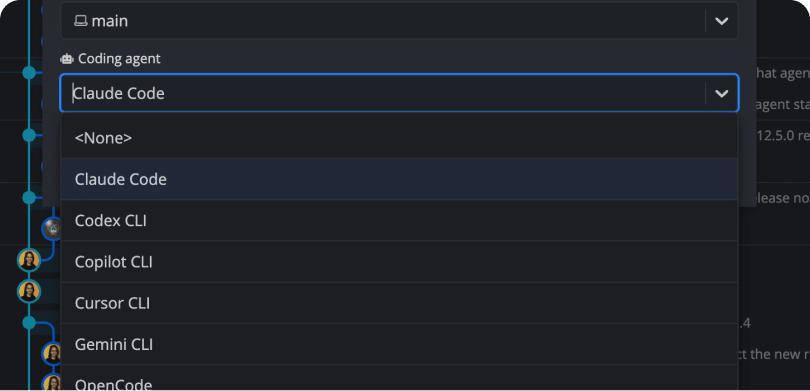
Bring Claude Code, Codex CLI, Copilot CLI, Gemini CLI, or OpenCode into GitKraken Desktop. Launch an installed coding agent and manage its work alongside your branches and commits.
For built-in GitKraken AI features, use the included provider or configure your own supported provider and API key.
From Agent Output to Code You're Ready to Merge
Countless developers and teams worldwide use GitKraken Desktop for its intuitive GUI, powerful terminal, and cross-platform support for Windows, Mac, and Linux.
Give each task room to run
Start a new agent session in its own worktree, a separate working directory on its own branch. GitKraken Desktop runs your configured setup commands and launches the agent, keeping the task separate from your current work.
Keep parallel work in view
See worktree branches and uncommitted change counts in Agent Sessions. Open a session to inspect its work or continue the conversation with your agent.
Review the code behind the response
Use the Commit Graph to follow branch history, then open the diff to inspect the actual changes. See what was added, removed, or modified before deciding what belongs in your next commit.
Move between tasks with tabs
Open worktrees in separate tabs to move between a feature, a fix, and a review. Worktrees from the same repository can stay grouped together in the tab bar.
Make agent output easier to review
Use AI explanations to get oriented, then inspect the diff. Commit Composer helps organize changes into logical commits you can adjust before applying. Generate a PR description to give reviewers a starting point.
Work through conflicts with context
Compare conflicting changes in the built-in merge tool. GitKraken AI can suggest a resolution with an explanation, so you can review it, make edits, and choose what to keep.
Make Your Next Agent Task Easier to Review
Working with agents in GitKraken Desktop is simple: open your repo, follow the changes, give your agent another round of feedback and merge when you’re ready. Try it for free today!
Includes a 14-day Pro trial with AI features unlocked. GitKraken AI requires a paid subscription after the trial period. Coding agents require their own setup and access.
Secure cloud-backed services that span across all products in the DevEx platform to keep your workflows connected across projects, repos, and team members
Launchpad – All your PRs, issues, & tasks in one spot to kick off a focused, unblocked day.Code Suggest – Real code suggestions anywhere in your project, as simple as in Google Docs.Cloud Patches – Speed up PR reviews by enabling early collaboration on work-in-progress.Workspaces – Group & sync repos to simplify multi-repo actions, & get new devs coding faster.DORA Insights – Data-driven code insights to track & improve development velocity.Security & Admin – Easily set up SSO, manage access, & streamline IdP integrations.
























 Add to Chrome
 Add to Firefox
 Add to Microsoft Edge