GITKRAKEN Codemaps

Visual Maps of Your Code

Whether you’re navigating legacy code or building new features, complex codebases can quickly overwhelm. GitKraken Codemaps creates visual understanding of your code structure, so you spend less time hunting through files and more time shipping features.

Get early access:

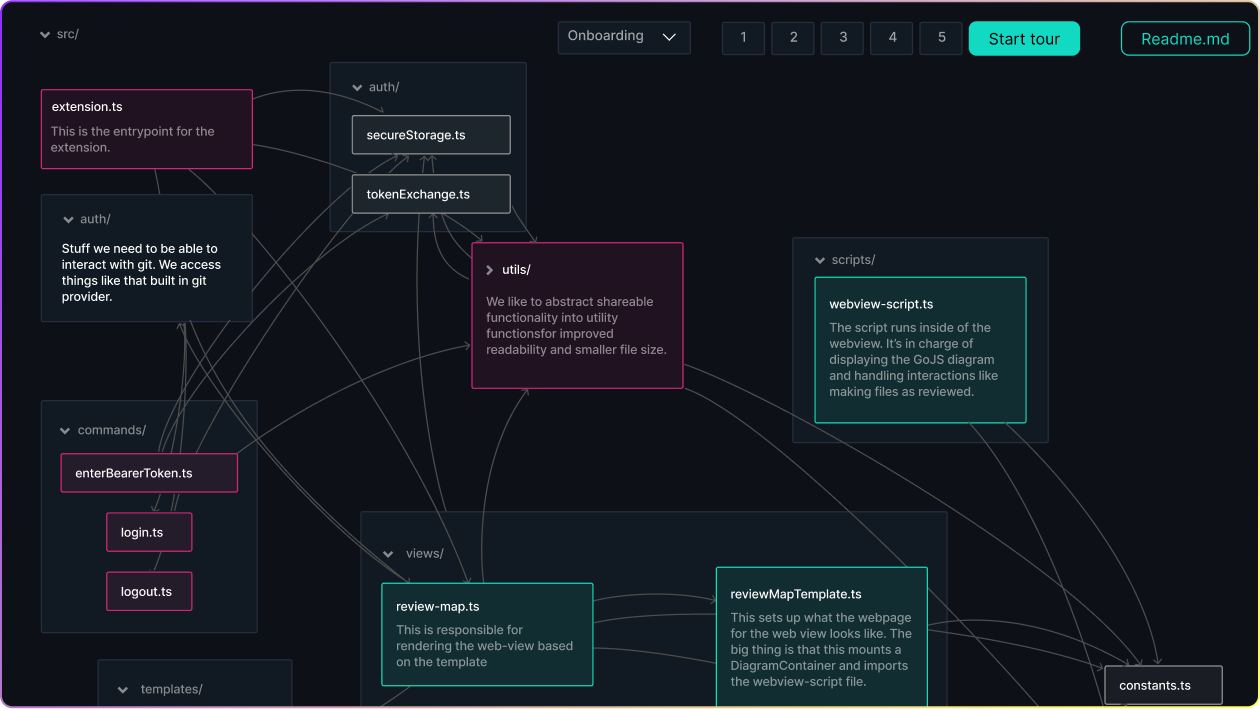
A code dependency map visualizes the structure of a project, showing files like extension.ts, tokenExchange.ts, and webview-script.ts connected by arrows that indicate their dependencies. Each file is grouped by directory (e.g., auth/, commands/, views/) and contains brief descriptions. The interface includes onboarding navigation steps and a “Start tour” button to guide users through the dependency graph.

Codemaps unlock confidence and speed in your Daily Development

Codemaps Features That Save You Hours

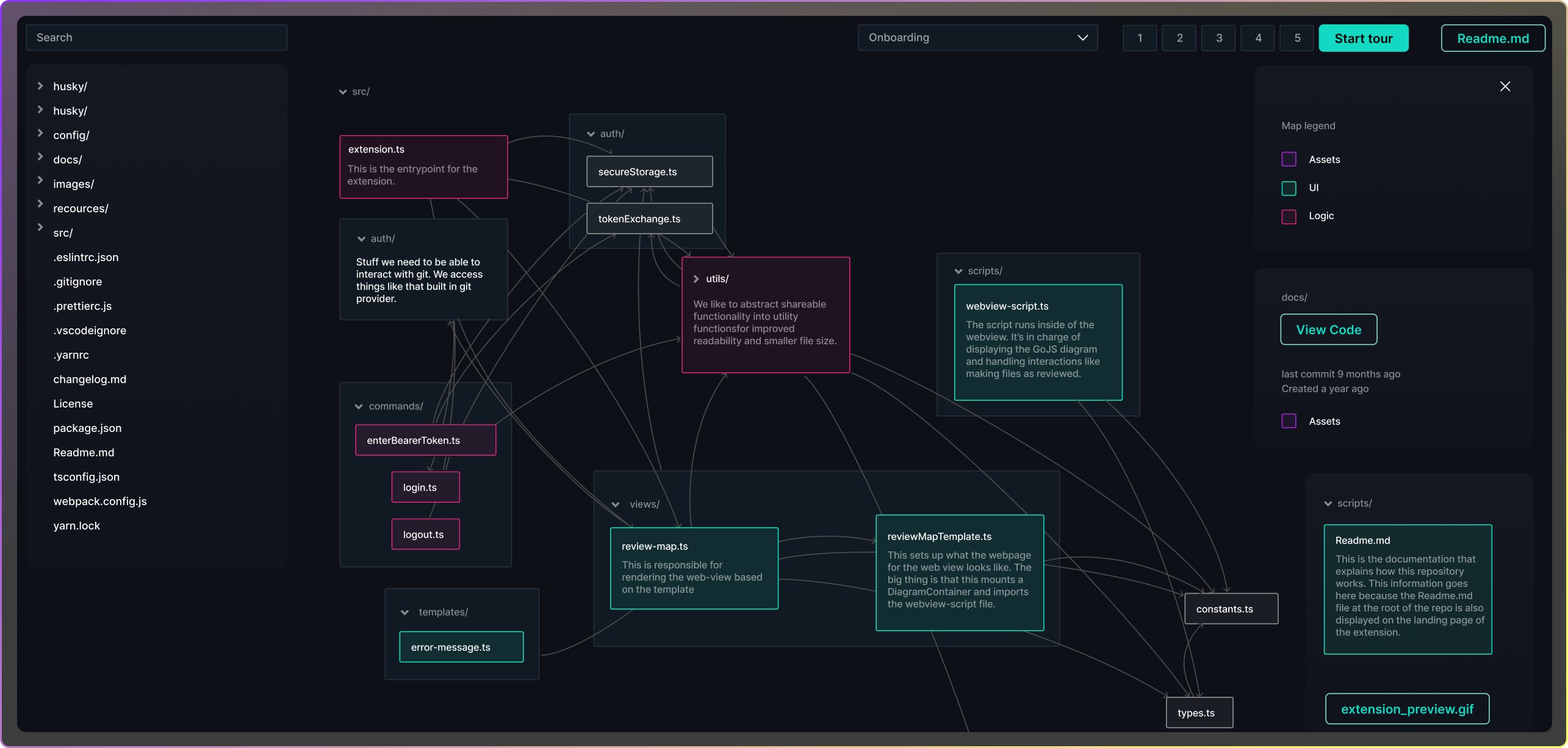
A code dependency map with an expanded file tree on the left, showing project files and folders. The central view visualizes the src/ directory with interconnected nodes such as extension.ts, secureStorage.ts, webview-script.ts, and reviewMapTemplate.ts, grouped by purpose (e.g., logic, UI, assets). Colored boxes and arrows illustrate relationships between files. A map legend on the right explains color meanings, and onboarding step navigation is visible at the top with a “Start tour” and “Readme.md” button.

Visual Code Dependencies

Get an instant view of your app’s directories and file relationships with clear upstream and downstream dependencies. Identify areas of code with the latest activity and most commits, so you can navigate complex codebases with visual confidence.

Interactive Tours & Knowledge Transfer

Create guided walkthroughs for new team members with contextual explanations and code insights. Reduce onboarding time from weeks to days while sharing institutional knowledge before it walks out the door.
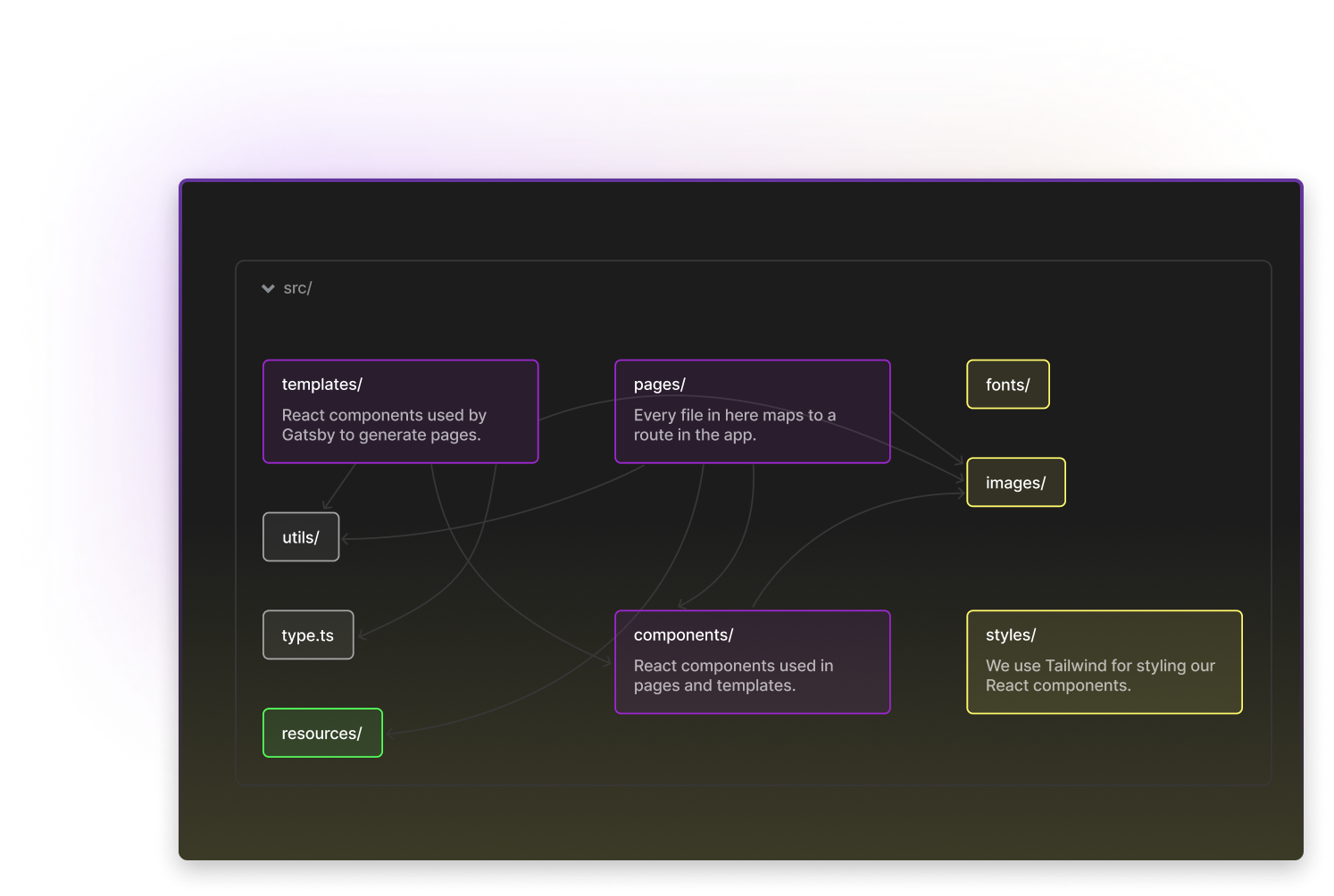
A color-coded code dependency map displaying the src/ directory structure for a React project. It includes labeled blocks for folders like templates/, pages/, and components/ (purple - React components), styles/, fonts/, and images/ (yellow - styling and assets), utils/ and type.ts (gray - logic), and resources/ (green - general resources). Arrows between boxes indicate dependencies and file relationships, designed to support onboarding and knowledge sharing with interactive navigation.
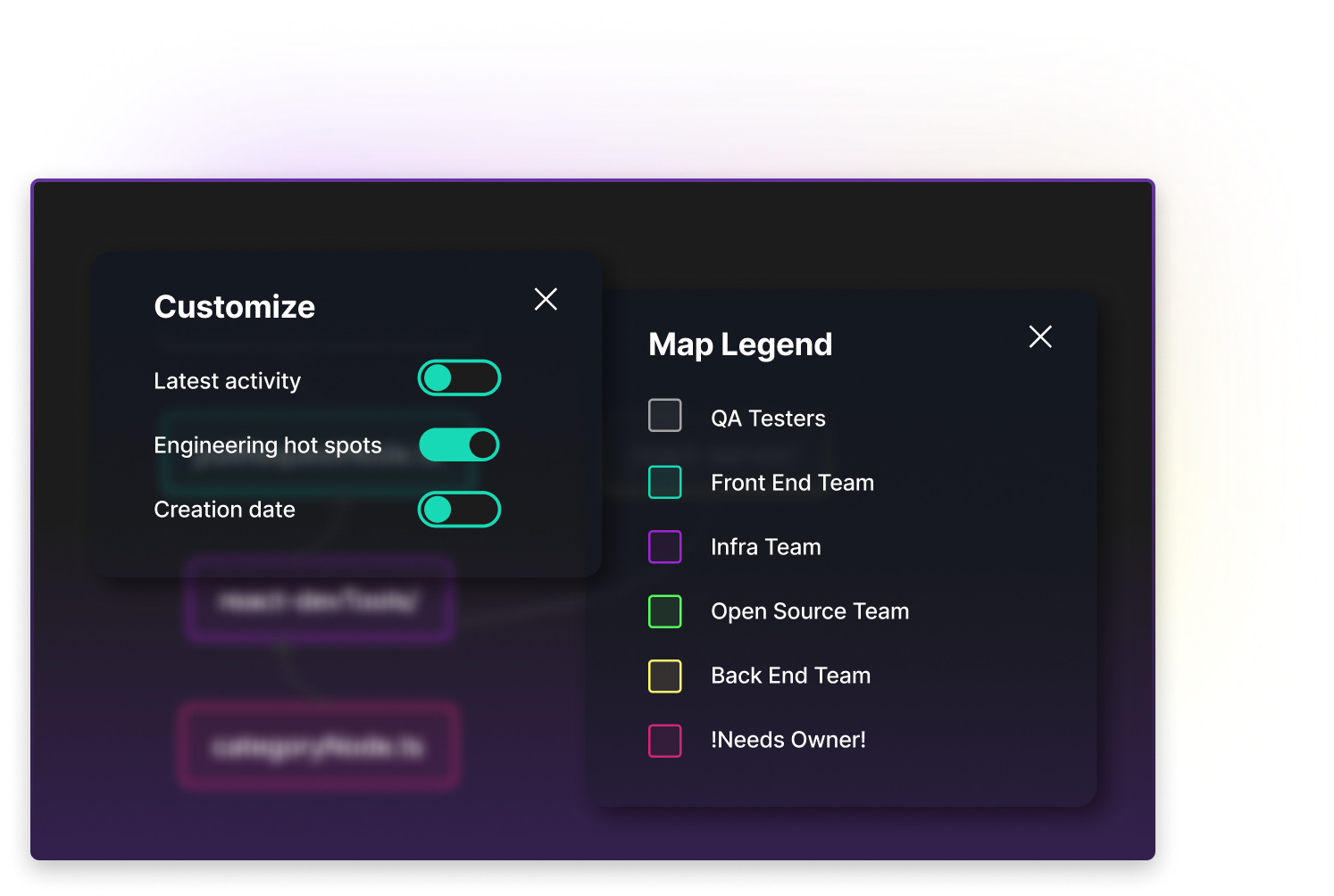
UI showing customization options and a map legend for a code dependency map. On the left, toggle switches enable filtering by latest activity, engineering hot spots, and creation date. On the right, the legend indicates color-coded ownership: gray for QA Testers, teal for Front End Team, purple for Infra Team, green for Open Source Team, yellow for Back End Team, and pink for files needing ownership. Designed to help teams visualize code ownership and activity trends.

Customizable Maps & Views

Create maps tailored to specific tasks or features using labels, color coding, and annotations for context. Focus views on relevant code sections and save custom perspectives to share with your team.

Proactive Collaboration

Connect with team members in shared workspace to gather feedback on architectural decisions instantly. Plan refactors collaboratively before writing code and document design discussions directly on the map.
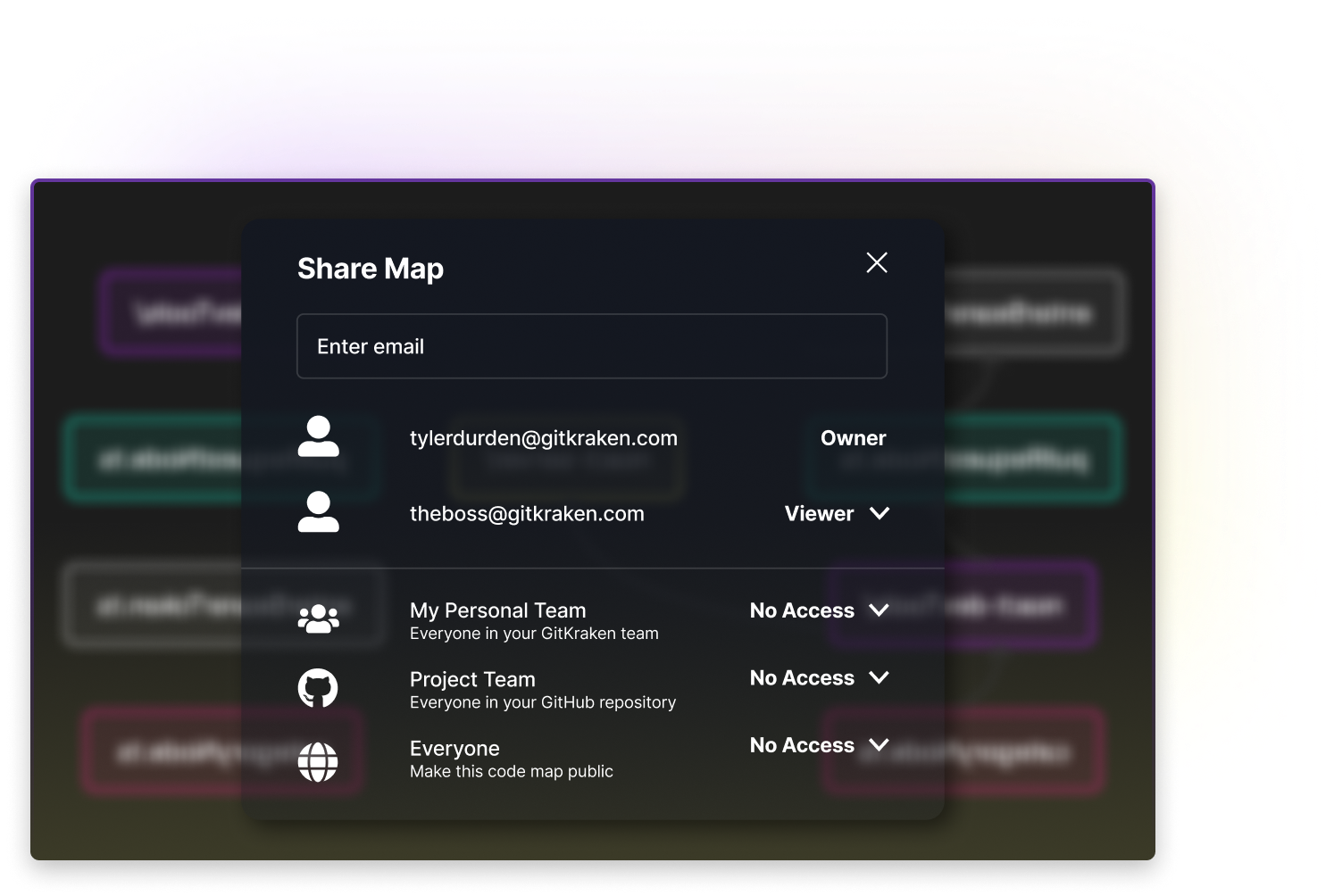
A “Share Map” interface for a code dependency map in GitKraken. Users can grant access by entering emails and assigning roles (e.g., Owner, Viewer). Below are group access options with dropdowns to set visibility for “My Personal Team,” “Project Team,” and “Everyone,” all currently set to “No Access.” Background shows a blurred code map with colored nodes indicating code ownership.

Codemaps will be available where you do your best git work

GitKraken Desktop
Launchpad serves as your morning hub to kick off commits, branches, and merges
GitLens for IDEs
Access Launchpad via command palette in VS Code and other IDEs for in-editor context
GitKraken CLI
Bring Launchpad visibility directly into your terminal for speedy triage
Issue Trackers
Works with GitHub, GitLab, Jira, Trello, Azure DevOps—filter by labels, sprints, milestones

Coming Soon - Get Early Access

Codemaps give developers confidence by minimizing lack of insight into dependencies and maintaining control as your codebase grows. Be among the first to experience visual code understanding.

This is just one pillar of our DevEx platform

Explore other GitKraken tools that help devs and dev leaders to Git efficiently and intelligently, so they can focus on what matters most.
Automations
AutomationsIncrease consistency across teams
Go To Automations →
Cloud Patches
Cloud PatchesShare early, merge swiftly
Go To Cloud Patches →
Codemaps
CodemapsVisualize your code
Go To Codemaps →
Code Suggest
Code SuggestFaster reviews, fewer restrictions
Go To Code Suggest →
Launchpad
LaunchpadFOne view, zero distractions
Go To Launchpad →
Security Controls
Security ControlsEnsure team security & compliance
Go To Security Controls →
Insights
InsightsBuild smarter, ship faster
Go To Insights →
Merge Tool
Merge ToolMerge conflicts, disarmed
Go To Merge Tools →

Frequently Asked Questions

Codemaps is a visual code mapping tool that creates interactive diagrams of your codebase structure, dependencies, and relationships. It helps developers understand complex codebases by providing visual maps of directories, file dependencies, and code changes. Use it to navigate unfamiliar code, plan refactors, and onboard new team members with confidence.
Codemaps will be available as a feature within the GitKraken ecosystem, designed to integrate seamlessly with your existing workflow whether you’re using GitKraken Desktop, GitLens, GitKraken CLI or GitKraken.dev. The visual maps work alongside your Git operations to provide context about code structure and dependencies as you develop.
Codemaps is currently in development and will be available through early access. Specific plan availability will be announced closer to the official release. Sign up for early access to be among the first to experience visual code understanding and help shape the product’s development.
Codemaps eliminates the guesswork when working with complex codebases by providing visual dependency maps and interactive tours. Developers can quickly understand how files relate to each other, see recent activity hotspots, and navigate code with confidence. This reduces time spent hunting through unfamiliar code and minimizes the risk of breaking dependencies during modifications.
Codemaps helps development leaders facilitate knowledge transfer and reduce onboarding time for new team members. Leaders can create interactive tours that preserve institutional knowledge, collaborate on architectural decisions in real-time, and ensure team members understand codebase structure before making changes. This leads to fewer bugs, faster feature delivery, and better team collaboration.